
QR Code Manager Is a Wallet, Not a Scanner
The queue behind me is four people long, the cashier has already said the total, and I need to show a barcode I have never once memorised. That is the moment this app was built for, and it is not a scanning moment.
QR Code Manager has been on the Play Store since May 2020, and I rewrote it from scratch in Flutter this year. For most of those six years I was quietly wrong about what it is. It started as a scanner, because that is what you build when you are annoyed at scanners. It is now something else, and the thing it became is more interesting than the thing I set out to make.
The short version: the useful unit of personal information is not the document and not the note. It is the short string you have to present to somebody — a carrier code, a membership number, a Wi-Fi password, a hospital record ID, an address in a language the courier can read, a phone number you cannot pronounce. Phones are bad at holding those. That is the actual product.
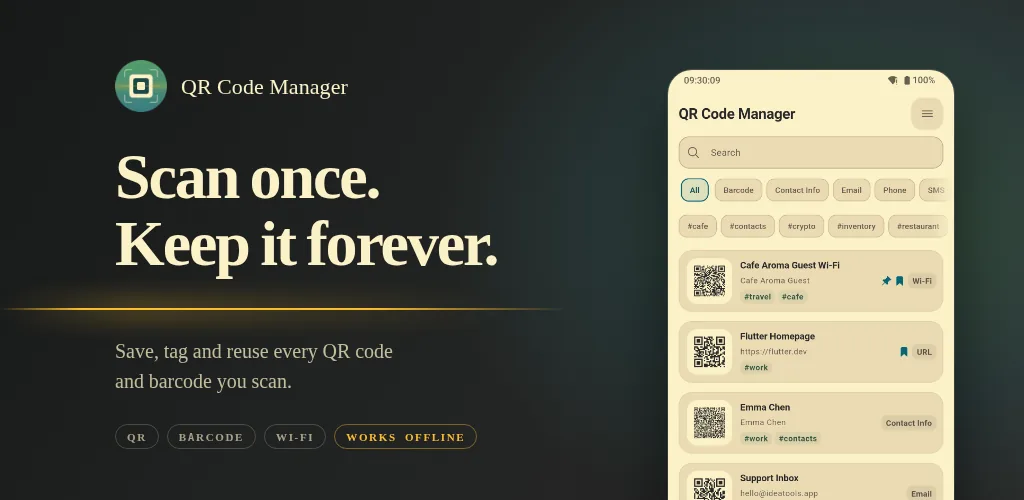
A scanner is a verb. This is a noun.
A scanner is something you do: point, decode, act, forget. The interaction is over in three seconds and leaves nothing behind. Every scanner app on the store models this correctly — it has a camera, and it has a history list, and the history list is a log, sorted by time, that nobody ever reads.
The moment you start keeping codes, almost every assumption in that design is wrong. A log is the wrong shape. Reverse-chronological is the wrong order — the code you want is the one you use every week, not the one you scanned last. "History" is the wrong word for something you curate. And a decoded string is not the unit you want either; you want a thing with a name, because TW14283910 is not memorable and "invoice carrier" is.
So the app's core table is not a scan history. It is a small library: each row has a title you wrote, the payload, the symbology, tags, a pin weight, a bookmark flag, and a scan count. Ordering is weight DESC, updated_at DESC everywhere in the app — pinned first, then most recently used, never "most recently acquired." Duplicates are prevented structurally by a unique index on (content, format), and the schema migration that introduced it merged the duplicates that already existed rather than failing or dropping them: union the tags, keep the highest scan count and weight, keep the earliest creation date, OR the bookmark flags. Re-scanning a code you already have increments a counter instead of adding a row.
None of that is a feature you would put on a screenshot. All of it is the difference between a list you keep and a list you abandon.
What I actually keep in it
Eight things, and each one is a scenario rather than a menu item.
The checkout code. In Taiwan this is the mobile invoice carrier — the personal one, scanned off the screen by the till; elsewhere it is a loyalty card or a store membership number. It lives on a home-screen widget, so the phone goes from locked to a scannable barcode without an app launching at all. The widget is written in Kotlin and reads the SQLite file directly to render the top three codes, pinned first, which means it draws without starting a Flutter engine. Version 1.6.1 added the same thing as a Quick Settings tile, so the code is one swipe down from the lock screen; the tile shows the code's title as its subtitle and greys itself out when the library is empty.
Guest Wi-Fi. A WIFI: payload generated once, shown on demand. Nobody reads a 20-character password out loud twice.
My address, in two languages. Customs declarations, delivery forms, an app that wants the Chinese version and a courier who wants the Latin one. This is a text row that exists purely to be copied, and that is a legitimate thing for a code app to hold — it is exactly the same job as the barcode, just with a different output device.
My own phone numbers. I live between countries and carry a local number in each, and two problems compound here. I cannot reliably recall a number I have had for four months. And even when I can, saying a string of digits out loud in a language I am still learning is its own small ordeal — one transposed pair and the callback never comes, and neither of us finds out until it doesn't.
So when somebody asks for my number I have stopped trying to say it. I open the app and show them the screen. Phone numbers are one of the three payload types the detail page enlarges automatically — a FittedBox scales a single-line phone, email or SMS payload up to the full width of the card, with no toggle to find — so what they are reading is large, unambiguous, and crucially not being pronounced by me. They read it off the screen in their own language, in their own head. This is the feature I would never have thought to build and now use more than the scanner.
Medical memos. An allergy list, and record numbers for three different hospitals, each of which is a nine-digit string I have never once recalled correctly under pressure. Tagged #medical, pinned when I am on my way to an appointment.
Contact cards. vCard and MECARD both parse, including the parts most implementations skip: folded vCard lines, escaped components, quoted-printable values, structured N name components, multiple phones and emails and addresses. The create form has repeatable fields for exactly that reason.
The company tax ID. Six months of working in Taiwan and this one still catches me every time. A restaurant bill only becomes a reimbursable expense if the invoice is printed with the company's 統一編號, an eight-digit number that belongs to my employer rather than to me. I need it perhaps twice a month, which is exactly the frequency at which a number refuses to stick. So at the till, with colleagues waiting and a queue behind them, I hold up the screen and the cashier types it in. Single-line text rows get the same enlarge control as phone numbers, here as a one-tap toggle in the content card rather than automatically.
Shipping and inventory. Any short text row that is valid Code 128 gets a "convert to barcode" action, so a tracking number becomes a scannable label. Twenty-five symbologies are supported for generation — QR, Aztec, Data Matrix, PDF417, Code 128/39/93, Codabar, the EAN and UPC and ITF families, GS1-128, ISBN, POSTNET, RM4SCC, Telepen.
Three of those eight are the same job wearing different clothes. The carrier code, my own phone number, the company tax ID — each is a string that has to get out of my phone and into another person or another system, accurately, in public, under mild time pressure. Speaking it aloud is the failure mode every time, whether because I cannot pronounce it, cannot recall it, or because the person on the other end is going to mistype it anyway. And each one is solved by the same unglamorous thing: a row I named once, can find in two seconds, and can hold up. Not one of them is a scanning problem.
The scanner is still there and still the fastest path in, with a continuous mode that saves each new code in the background, gallery scanning that falls back to a cropped and a 2×-upscaled variant built in a background isolate when the first pass fails, and an ACTION_SEND handler so you can share a screenshot into the app from anywhere. But it is now an input method, not the product.
The parts you only notice when they are missing
There is a category of work that generates no feature bullet and no screenshot, and it is most of what separates an app you keep from an app you delete in week two.
Pin and bookmark are deliberately two different concepts, because "I use this constantly" and "I want to find this again" are two different statements and collapsing them into one star makes both useless. Every destructive action is undoable — single delete, batch delete, batch bookmark — because a list you are actively curating is a list you will misclick in. Type filter chips are computed from what is actually in your database rather than hard-coded, so you never see an empty "Wallet" filter, and an active filter clears itself when the last matching row goes away.
Every layout has to survive the system font at 2× scale without clipping, and there are screenshot tests in both themes at both text sizes that fail the build when one doesn't. There are twelve in-app locales, and an unsupported language falls through to your next preferred one rather than to a default — which sounds like nothing, and means that someone whose preferences run Thai, then Japanese, then English gets Japanese instead of being dumped into English.
The theme is a hand-tuned gruvbox in both light and dark, with the dark neutral lifted toward white because gruvbox's bright blue does not carry enough contrast at small sizes. The scanner chrome is deliberately theme-independent — always dark, always the same constants — because a scanner that flashes white at night is a scanner you stop using at night.
The safety work nobody asks for
This is the part I would put first if store listings had room for it.
A QR code is an opaque pointer that a stranger printed. Tapping one is closer to clicking a link in an email from an unknown sender than it is to typing a URL, and almost no scanner treats it that way. url_safety.dart runs one set of heuristics that both the confirmation dialog and the auto-open gate share, so the two cannot drift apart. It flags:
- plain
http:// - raw-IP hosts, including the non-dotted-quad forms —
2130706433,0x7f000001,0177.0.0.1all match, because a host whose labels are all decimal or hex integers is an IP however it is spelled - punycode and homoglyph hosts (
xn--labels, percent-escaped non-ASCII) - userinfo spoofing —
https://[email protected]goes toevil.com, and this is still the single most effective URL trick there is - a list of TLDs that are overwhelmingly used for throwaway hosts
utm_*, fbclid and gclid are stripped from the query string before the link opens, with a visible notice on the detail page when it happened. The optional auto-open setting is deliberately stricter than a manual tap: HTTPS only, a non-empty host, zero warnings, and only when exactly one code was found in the frame.
And my favourite piece of defensive work in the whole codebase: Wi-Fi password redaction is implemented twice, in two languages. Dart never shows a password in a list or summary surface. But the home-screen widget and the Quick Settings tile are Kotlin, they read the database directly, and the tile is visible on the lock screen — so SavedCodes.safeDescription re-implements the WIFI: escaping rules in Kotlin to render Wi-Fi: <SSID> and nothing else. A privacy rule that only holds on one side of a language boundary is not a privacy rule.
The app also ships with no analytics, no ad SDK, and no HTTP client at all. The manifest declares no permissions of its own; camera and media access arrive only through the scanner and image-picker plugins. There is nothing to opt out of because there is nothing there.
What an ad-funded scanner is optimising for instead
The differences are not a feature comparison. They are downstream of one decision — whether the app has to earn money from your attention.
| Ad-funded scanner | QR Code Manager | |
|---|---|---|
| Cold start | Interstitial before the camera | Camera, via a cached Flutter engine |
| Business model | Ads, subscription, or both | None. No purchases, no tier |
| Network code | Ad SDK, analytics, remote config | None — there is no HTTP client in the dependency list |
| Saved codes | A time-ordered scan log | A curated library: titles, tags, pin, bookmark, scan count |
| Ordering | Most recently scanned | Pinned, then most recently used |
| Duplicates | Another row | Merged, counter incremented |
| Where your data is | An account, a server, a privacy policy | One SQLite file on the device |
| Leaving | Export if you are lucky | JSON backup, versioned, via the share sheet |
| Link handling | Open it | Heuristics, tracking-param stripping, a stricter auto-open gate |
The last row is the one that matters most and reads as the least exciting, which is a fair summary of the whole project.
What it does not do
Being specific about this is more useful than another feature list.
It is Android only — there is no iOS build, and there is no ios/ directory to start one from. The release is arm64-only. There is no cloud sync and no account, which is the direct cost of the privacy position: moving to a new phone means exporting a JSON backup and importing it. Export is JSON only. It does not parse otpauth: TOTP secrets, geo: coordinates, or calendar VEVENT payloads; those are real gaps rather than decisions.
And it has roughly a hundred installs, against category incumbents at a hundred million, which is a sufficiently strange fact that I wrote a separate post about why — because the answer turned out to have almost nothing to do with anything on this page, and that is exactly the point.